Статьи о спутниковых телефонах, оборудовании и спутниковой связи.
Inmarsat, Iridium, Thuraya, Globalstar
Description and features of Iridium 9575 Extreme satellite phone in standard package
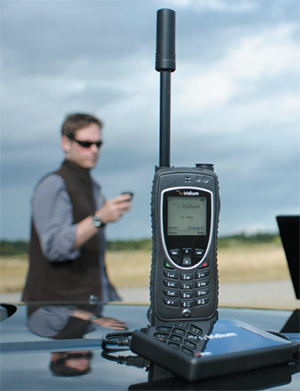
Buying a satellite phone nowadays is no longer exotic, but a daily necessity for a person in modern society. Using a satellite phone is not much different from using a regular mobile phone, but there are still some differences. Below we will examine the functionality and possible issues with the operation of the Iridium 9575 Extreme satellite phone.
General technical specifications and description were briefly mentioned here, and now we will look at the use of the device in more detail.
The standard package includes two adapters that connect to the bottom of the phone and allow you to connect the device via USB cable and an external antenna, which is also included.
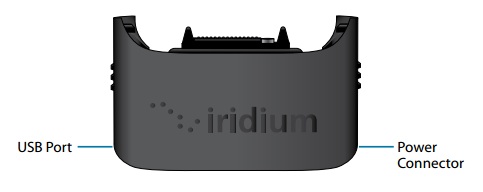
The first adapter is used for charging or connecting the 9575 to a computer via USB cable.
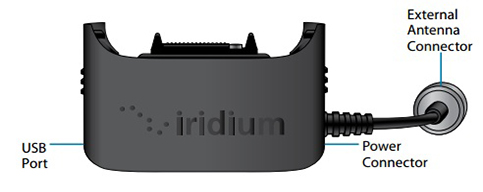
The second adapter, in addition to USB, allows connection to an external antenna via a TNC connector.
To correctly connect the adapter, hold the phone in one hand, squeeze the adapter clips with the other, and connect them until you hear a slight click, then put the protective rubber band on the bottom of the phone. Make sure the adapter fits tightly to the phone, otherwise moisture may get on the contacts and the device will fail.
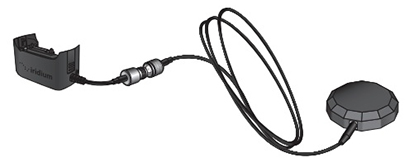
External antenna is included in the standard package of the Iridium 9575 and is used under shelter, in a house or vehicle where there is no open sky. The antenna attaches to the phone via the adapter and has a magnetic side, allowing it to be easily attached to a metal surface.
The antenna helps with signal reception only if there is a clear view of the sky. For example, if you place the antenna outside the window but part of the sky is blocked by tall buildings or trees, the connection may be unstable.
For additional phone protection, a leather case is included. The case has a clip for attaching to a belt, and while the phone is in the case, you can still attach cables and adapters.
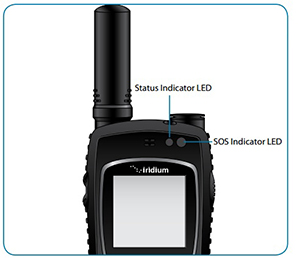
Indicators
The Status Indicator can light up in several variations:
SOS Indicator
Battery charging. When purchased, the battery is not fully charged and may take longer to reach 100%. The Iridium 9575 is quite resistant to all influences, including power. But every battery has its own service life. If the phone battery has been discharged and not used for a long time, a full charge-discharge cycle is necessary for correct operation.
To extend battery life, it is recommended to charge the phone at room temperature. Charging at temperatures below 0°C or above 45°C negatively affects battery life and capacity.
The package includes a set of 5 adapters for main types of sockets and a charger to which the adapters are easily connected. Use only the original Iridium charger.
Using the Iridium 9575 satellite phone
For correct and most efficient operation of the phone, you should follow some conditions:
Making and receiving calls
To make a call, the phone must be turned on and the SIM card active. Fully extend the antenna and point it at the sky. The subscriber number must be dialed in international format: + or 00, country code, phone number. For example, to call us, dial: 00 38 066 956 41 47.
Receiving calls can occur with the antenna extended or folded. With the antenna folded, before the call the phone will emit a sound signal with the message "Call Attempt" and suggest extending the antenna. Extend the antenna, point it at the sky, after which the phone will start vibrating and ringing, "Incoming Call" will appear on the screen, then press the answer button. When connected correctly, "Connected" will appear on the screen.
The message "Call Failed" means the antenna is not pointed correctly or the signal is too weak.
Missed calls. If someone tried to call you but the phone was out of network or you did not answer, the caller can leave a voicemail. When the phone appears in the network, a message about an unheard voicemail will be displayed. You can listen to the voicemail by holding the "1" key for 2 seconds or through Menu → Voicemail.
The Iridium 9575 satellite phone has a silent conversation function. To activate it, press the left "Soft" button during a call. You will hear the other party, but they will not hear you. To turn off silent mode, press the left "Soft" button again.
Speakerphone is activated by pressing the right "Soft" key. In this mode, the rear speaker of the phone turns on. You can turn off speakerphone by pressing the right "Soft" button again.
To lock the phone keypad, press the "Menu" and "*" buttons. Unlocking is done the same way.
Check balance on the Iridium satellite phone account can be done by:
Sending an empty SMS from the Iridium phone to number [+2888] — you will receive a reply with the balance;
Calling [+2888] from the Iridium phone and listening to the voice auto-informer about the account status.